

Short Explanation
At work I take care of seven internal PHP apps: an HRIS, an ERP, an e-learning platform, an asset management system, and a few smaller ones. Most are CodeIgniter, none of them have tests, and my colleagues push to several of the same repos. Requests come in small: the login footer shows the wrong year, a report is missing a column, a filter ignores one of its fields. I wanted AI agents to take some of that off my plate, but I didn’t want them running loose on apps that hold real employee data.
devflow is what I built for that. I send a request from Telegram, Claude Code reads the project and writes a plan, and opencode (running a cheaper model) writes the code in a separate git worktree. Claude then reviews the diff. I approve twice from my phone, once for the plan and once for the diff, and what I get at the end is a branch that I merge myself. The source is on GitHub.
Project Goals
The rules I set for it before writing any code:
- No code gets written until I’ve approved the plan, and nothing is done until I’ve approved the diff
- The agents can’t merge, push, or touch
mainordevelopment - Since there are no tests, the bot has to collect its own proof that the change works, not just take the agent’s word for it
- Every task starts from the latest
origin/development, so it doesn’t step on what my colleagues are doing - Neither agent can read
.env, the database config, or any keys - All of it has to work from my phone
Tech Stack
Bot:
- Python with
python-telegram-bot, answering only my chat id - A small task state machine:
new → planned → coding → review → done, plusblocked
Agents:
- Claude Code in headless mode (
claude -p) as the planner and reviewer - opencode (
opencode serve) as the worker - A custom MCP server, which is the only way the agents can write to my notes
Isolation and checks:
- A git worktree and branch per task, plus a temporary nginx vhost from my local dev stack
- HTTP checks before and after the change,
php -l,git merge-tree, and a screenshot from headless Playwright
Task storage:
- My Obsidian vault. Each task is a markdown note with the spec, the worker log, the review, and the result
How It Works
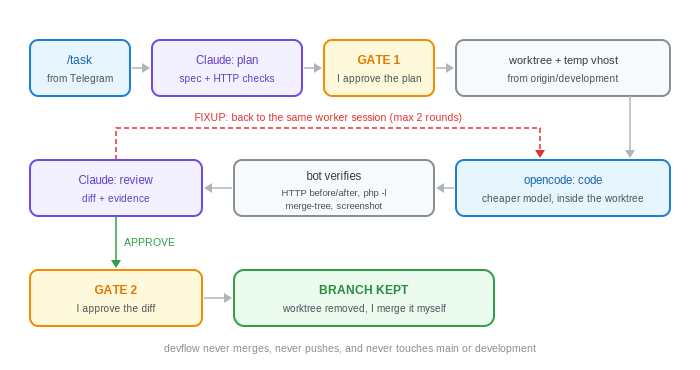
A task starts with one message, something like /task asm the login footer still says 2024. The bot saves the request as-is and opens a note for the task. Claude reads the project docs, my notes on that project, and the code (read-only), then writes a spec. The spec covers the cause with file and line, what changes in each file, what not to touch, and a few HTTP checks that should pass afterwards. Before Claude plans, the bot also fetches from the remote and gives it a list of other unmerged branches and the files they touch, so it can stay away from those files.
Once I approve, the bot creates a worktree from a fresh origin/development. It links in the gitignored stuff the app needs to run (vendor, .env, the database config) and copies the project’s nginx vhost under a new hostname pointing at the worktree. opencode writes the code. The bot does the commit, because the worker isn’t allowed to run git commands that change history.
Then the bot checks the work itself. The HTTP checks run against both my main checkout and the worktree, so I can see before and after. Every changed PHP file goes through php -l with the same PHP version the project uses. git merge-tree tests the merge into origin/development without touching any checkout, and Playwright takes a screenshot of the first page checked.
Claude reads the diff and all of that, then answers APPROVE or FIXUP with a short fix-up spec. A fix-up goes back to the same opencode session, and after two rounds the task stops and waits for me. At the second gate I get the diff stat, the check results, and the screenshot on Telegram. The bot fetches and tests the merge one more time before accepting my approval, in case development moved while I wasn’t looking.
Why two models? Cost, mostly. Writing code burns the most tokens, but the decisions that matter happen in the plan and the review, so Claude only does those two jobs and the cheaper model does the typing.
The Problem I Kept Coming Back To
Getting the agents to write code was the easy part. The part I kept going back to was keeping them inside the lines.
I already knew prompts weren’t enough. Before devflow, I’d tried giving an agent the rules for my vault in its prompt, and it still left 20 junk files in the project notes folder. So in devflow the agents can’t edit the vault at all. They get an MCP server with five tools: read a task, add text to certain sections of a task, move the task to its next state, add a decision to a project note, and update one section of a project note. File names come from task ids and project names that already exist, every path has to stay inside three folders, and the state machine is the same one the bot uses. If an agent tries to mark its own task as done, the server just refuses.
The rest works the same way. .env, database configs, and keys are blocked for both agents. I checked this, and Claude was refused for both Read and Grep. The worker can’t run git commands like commit, checkout, or reset. And opencode isn’t allowed to stop and ask for permission, because with nobody at the terminal it would just hang. A watchdog checks every three seconds, rejects any pending permission request, and pings me on Telegram.
The downside is that every new thing I want an agent to do means writing and testing a new MCP tool. That makes devflow slower to extend. For apps like an HRIS, I’m fine with that.
Lessons Learned
The first real task was the login footer from the example above, on the asset management app. I sent it from Telegram, the plan came back in 36 seconds and cost about $0.35, and I approved the diff around 15 minutes after sending the request. That fix is now a normal commit in the project’s history.
It also broke twice on the way. I had 57 tests, including runs of the whole pipeline against real git repos with a fake colleague pushing conflicting changes, and neither problem showed up in them:
- The commit failed. I was excluding
.envandvendorfromgit add, but the project already gitignores them, and git refuses an exclude for an ignored path. - Cleanup failed on Windows, because opencode’s file watcher still had the worktree folder open.
I fixed both the same day and added a regression test for the cleanup. Now a partial cleanup shows up as a warning instead of failing a task I’d already approved. Tests only cover the cases I thought of, and the first real task found two I hadn’t.
I also changed my mind about where I should step in. At first I only wanted to approve the final diff. Approving the plan too turned out to be worth it: it takes a few seconds on my phone, and a wrong approach gets stopped before any tokens go into coding it. Diffs are faster to review when the check results come with them, too.
devflow is still a tool I use for my own work, not a product. It’s on GitHub if you want to see how it’s put together.