

Every repository with more than one contributor eventually hits the same question: where does new work happen, and how does it get back into main? Without an agreed answer, the branch list turns into a graveyard of fix2, fix2-final, and fix2-final-really, and nobody’s sure which one is safe to deploy. A branching strategy is what stops that from happening.
What is a Branching Strategy
A branching strategy is a set of rules a team agrees on for three things: when to create a branch, what to name it, and how it gets merged back. It’s not about the git branch command. That part is trivial. It’s about the workflow around it: who can merge, what triggers a deploy, and how releases get cut.
The right strategy depends on how the team ships. Continuous deployment multiple times a day is a different problem than scheduled releases every few weeks. Copy a strategy built for the other case and you inherit friction that has nothing to do with your code.
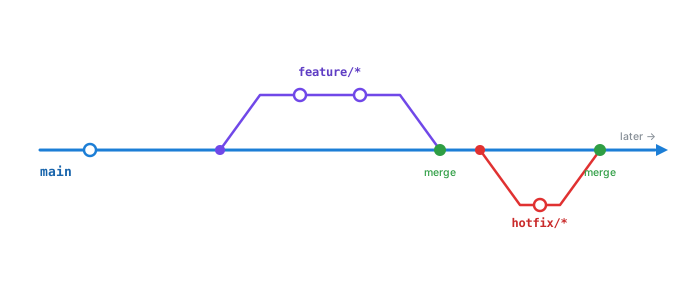
Git Flow
Git Flow runs on two long-lived branches: main for production and develop for integration. Everything else is short-lived and built for one job:
feature/*branches offdevelop, merges back intodeveloprelease/*branches offdevelopwhen it’s ready to ship, merges into bothmainanddevelophotfix/*branches offmainfor urgent fixes, merges into bothmainanddevelop
git checkout -b feature/checkout-flow develop
# ... work happens ...
git checkout develop
git merge feature/checkout-flow
That structure buys you a real release process: a place to stabilize a build before it ships, and a clean line between “in progress” and “in production.” It also buys you overhead. Every change touches at least two branches, and teams that deploy often feel the extra merges as drag, not safety. Git Flow suits versioned software with a changelog. It suits a SaaS app shipping five times a day a lot less.
GitHub Flow
GitHub Flow throws most of that out. One long-lived branch, main, and nothing else sticks around. Every change is a short-lived feature branch that merges back through a pull request.
git checkout -b add-search-filter main
# ... work happens ...
# open a PR, get it reviewed, merge into main
One rule holds the whole thing up: main is always deployable. Merge, and it ships, usually straight through CI/CD, no develop to sync and no release/* branch to babysit. The catch is what that rule assumes: a CI pipeline you actually trust, and feature flags for anything that isn’t ready the second it merges. Skip either one and “always deployable” quietly turns into “deployable most of the time, we hope.”
Trunk-Based Development
Trunk-based development takes GitHub Flow and shortens the leash further. Branches, if they exist at all, live for hours. Developers push small changes straight to main (the “trunk”) or merge a feature branch back within the day.
Bigger changes still ship. They just ship dark, gated behind a feature flag instead of parked on a branch for weeks:
if (featureFlags.isEnabled('new-checkout')) {
  return <NewCheckout />;
}
return <LegacyCheckout />;
Short-lived branches mean small diffs, and small diffs mean merge conflicts that are actually mergeable. The price is discipline. Real test coverage, feature flags for anything half-built, a team that’s fine committing in small pieces instead of one giant branch at the end of the sprint. Skip the safety net and a big team on one codebase won’t break main occasionally — it’ll break it weekly.
GitLab Flow
GitLab Flow lands in between. It keeps main as the single source of truth like GitHub Flow does, but adds environment branches (staging, production) for teams that need a real staged rollout instead of “merge means deploy, full stop.”
main → staging → productionCode moves one direction, downstream through each environment. You get an actual staging step without dragging back Git Flow’s entire branch matrix to get it.
Comparing the Strategies
| Strategy | Long-lived branches | Best for |
|---|---|---|
| Git Flow | main, develop | Scheduled releases, versioned software |
| GitHub Flow | main | Continuous deployment, small-to-mid teams |
| Trunk-Based | main | High-frequency deploys, strong test/flag discipline |
| GitLab Flow | main + environment branches | Staged rollouts (staging → production) |
How to Choose
Start from how often you ship. Not from which strategy sounds the most professional in a design doc.
A team pushing to production several times a day gets nothing from develop and release/* beyond extra merges to manage. GitHub Flow or trunk-based development fits better. A team shipping a versioned product on a schedule, where a fix sometimes has to land on last quarter’s release too, actually needs the structure Git Flow provides.
Match the strategy to what the team can support, not to what looks rigorous on paper. Trunk-based development without feature flags or solid CI doesn’t remove the chaos, it just moves it from the branch list into main itself. Pick the simplest strategy that fits your release cadence, and only bolt on more structure when a real problem (not a hypothetical one) actually asks for it.
Thanks for Reading✌️