

A server-rendered page shows up fast. Content’s on screen the moment the HTML arrives. Click a button in that first second, though, and nothing happens — the markup is there, but the JavaScript that’s supposed to respond to your click hasn’t attached to it yet. Hydration is the step that closes that gap.
What Hydration Actually Does
Building a page from scratch and hydrating an existing one look similar in code, but they’re not the same operation:
// Client-side rendering: build the DOM from nothing
createRoot(document.getElementById('root')).render(<App />);

// Hydration: attach to DOM that already exists
hydrateRoot(document.getElementById('root'), <App />);
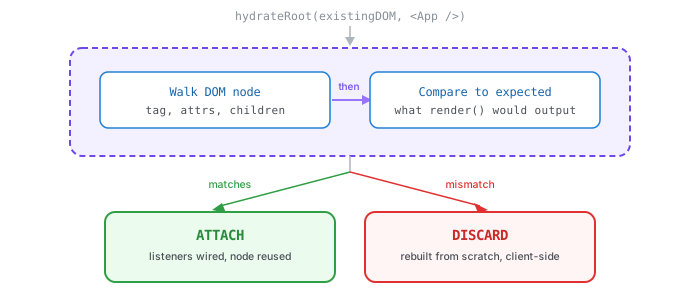
createRoot doesn’t care what’s in #root — it throws it away and builds fresh. hydrateRoot does the opposite: it assumes the HTML inside #root is already correct, walks it node by node, and reuses every element it finds instead of recreating it. All it adds are the parts HTML can’t express on its own: event listeners, component state, refs.
Match, Then Attach
Step by step, hydration looks like this:
- The server-rendered HTML paints. The user sees real content immediately.
- The JS bundle for the page loads, in parallel or right after.
hydrateRootwalks the existing DOM tree, comparing it to what the framework would have rendered on its own: same tags, same order, same attributes.- Where it matches, nothing gets rebuilt. The framework just attaches listeners and hooks the node into its component tree.
- The page is now interactive, without a single element having flickered out and back in.
When the Match Fails
Step 3 is where things break. If the DOM the browser actually has doesn’t match what the framework expected to produce, that’s a hydration mismatch, and the framework’s only real move is to throw away the mismatched part and rebuild it client-side, exactly like plain CSR would have.
A few ways that mismatch shows up in real code:
// server renders one time, client renders a slightly different one a moment later
<span>{new Date().toLocaleTimeString()}</span>- Time and locale: the snippet above renders whatever time it was on the server, then a slightly different time on the client. Two different strings, same component.
- Random or generated IDs:
Math.random()or a fresh UUID produces a different value on every render, server included. window-only checks: code that behaves differently depending on whetherwindowexists renders one way on the server (nowindow) and another in the browser.- Browser extensions: Grammarly and similar tools inject attributes into the DOM before hydration ever runs, so the “existing DOM” hydration inspects isn’t actually what the server sent.
The fix for the timestamp case is usually to not fight it: render a placeholder on the server, and fill in the real value only once the client has taken over.
const [time, setTime] = useState(null);
useEffect(() => setTime(new Date().toLocaleTimeString()), []);

return <span>{time ?? '--:--:--'}</span>;
Now the server and the client agree on the very first render (null), and the real value only shows up after hydration finishes, which is exactly where it was always going to change anyway.
The Cost Nobody Sees
Hydration doesn’t skip the work CSR does, it just moves it. The same JS still has to download, parse, and run, building up the exact component tree it would’ve built from nothing, just to confirm it can reuse what’s already there instead of it. A heavy page with dozens of interactive components can look completely finished, and still be a few hundred milliseconds from actually responding to a click.
That’s the uncanny part of SSR done at scale: the content is real, and the page looks ready well before it actually is.
Why it Matters
Hydration is the seam between the two rendering models covered here already. SSR skips CSR’s blank-page wait by sending real HTML first. CSR builds and wires up interactivity in one pass, with nothing to show until both are done. Hydration is what SSR pays afterward to get CSR’s interactivity anyway, without giving up that fast first paint — the same JavaScript cost as CSR, just moved to after the content’s already on screen instead of before.
Thanks for Reading✌️